
All your accounts One space
Veydan Space brings isolated browser profiles, proxies, SSH, notes, passwords, 2FA and encrypted chat together in one app. Your data stays on your device. The code is on GitHub for anyone to read.
Windows 10 / 11 · macOS · Linux · Android 8+ · Free, no sign-up
Everything you need
One Veydan
Veydan Space — a workspace where notes, passwords and chat run as built-in modules. Chat, Pass and Notes are the same modules as standalone apps. Install one, two or all four.
One window for many accounts.
+One window for many accounts.
A workspace for accounts, proxies and servers
Browser profiles are grouped by client and project, each with its proxies, passwords, notes and chat right beside it. One click opens a profile with the right proxy.
On mobile, you get notes, passwords, 2FA codes, a password generator, and chat. Profiles, proxies and SSH stay on the computer.


Workspaces
Group profiles by client, project or team. A tag-based kanban board, a table view and a graph of how profiles connect to proxies.

Private messaging. No phone number required.
+Private messaging. No phone number required.
End-to-end encrypted direct and group chats
Encrypted chat
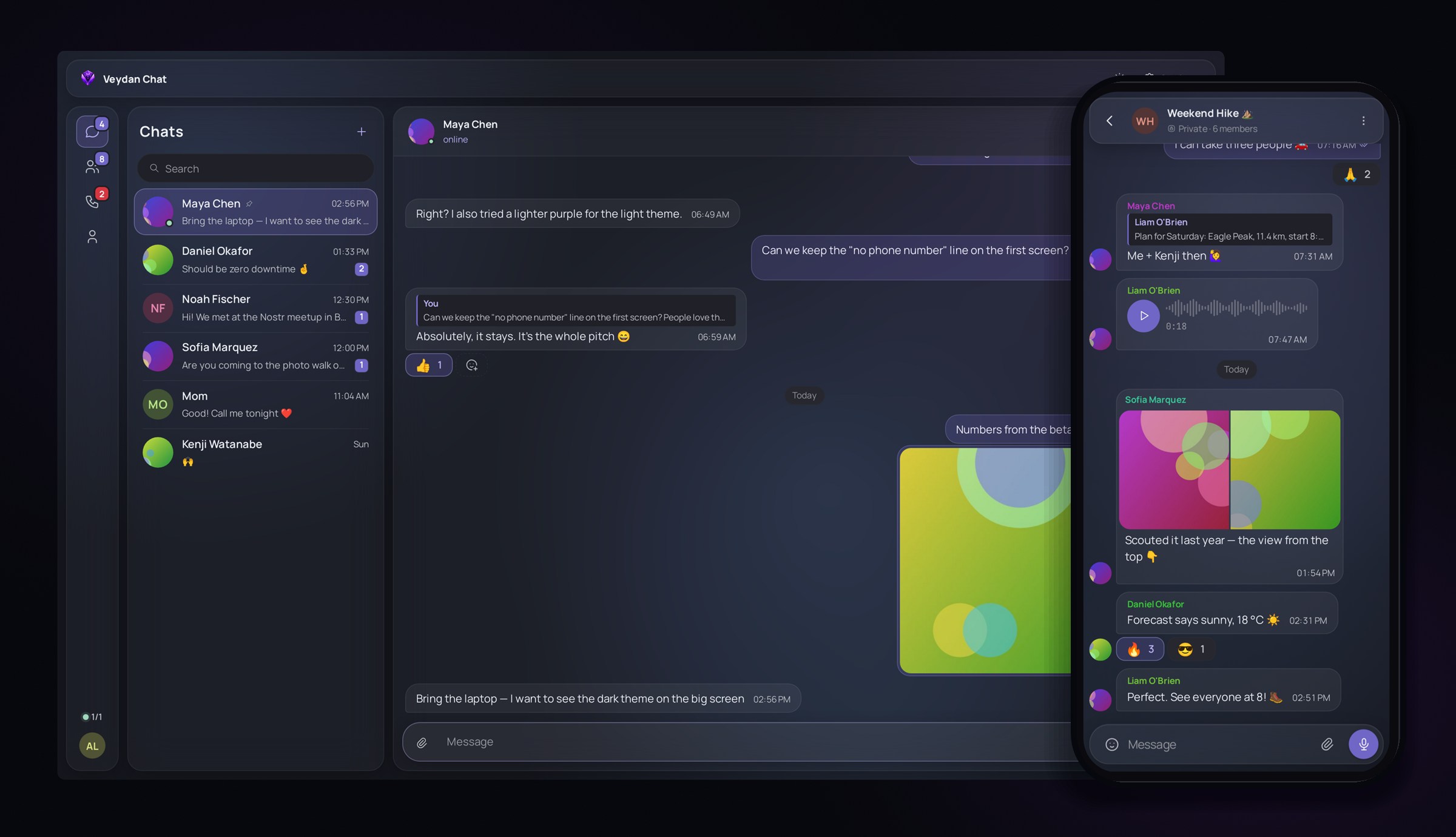
End-to-end encrypted messaging on Nostr. Groups, albums, voice and video, no phone number.
Messaging with no phone number and no central server.
Built into Space and also available as the standalone Veydan Chat app. Your account is a cryptographic key generated on your device. Nobody issues it, and nobody can take it away.
The server sees neither the message nor the sender
Direct messages are sealed on your device using NIP-44 and NIP-17/59. Relays only ever hold an encrypted envelope.
Groups with roles
Public or private, with an owner, admins and moderators. When someone is removed, the group rotates to a fresh AES-256-GCM key.
Photos, files, voice and video
Albums, files of any kind, voice notes and round video messages. Large uploads can be paused and resumed.
Message requests
Messages from unknown contacts arrive as requests. Accept it, decline it or block them.
Your own servers
“My servers” mode: only your relays, your media storage (S3 or Blossom) and your own push server.
Works on restricted networks
If Veydan’s servers are blocked, chat connects through a bridge. The bridge can’t read your messages.
Your password and 2FA code. Together.
+Your password and 2FA code. Together.
A password manager and authenticator in one app

Passwords and 2FA
A password manager plus one-time code and password generators. Everything can be tied to a workspace or profile.
Your username, password, and one-time code are all in one place, ready to copy with a click.
Your notes. Your files.
+Your notes. Your files.
Markdown files. Version history built in.

Notes
Markdown files on disk, with version history, diffs, restore and three-way merge.
Notes that stay plain files on your disk.
Markdown notes built into Space and also available as the standalone Veydan Notes app. They live in a folder you choose, sync through storage you own and work on your computer and phone. Nothing is locked inside the app.
Your notes are plain files
Every note is a Markdown file in a folder you choose. Open it in any editor and back it up however you like.
Write in Markdown, see it formatted
Headings, tables, checklists, quotes and code blocks, or the raw source in one click. Drop in a picture or a file and it becomes an attachment.
Organize your way
Folders, colored tags, pins, an archive and smart views. Type [[ to link a note, and every note shows what links back to it.
A table of all your notes
Switch the list to a table and tags become columns. A pile of notes turns into a tracker you can sort.
Nothing gets lost
Sync conflicts never throw anything away. Edits from two devices are merged line by line.
Capture in a second
A quick-capture window from the tray, a command palette for every action and full-text search across all notes. Templates, plus import and export as ZIP.
Start with what you need
Add more anytime
Space has the same password vault and the same notes as Pass and Notes, and the same chat as Chat. Only need passwords? Install Pass. When you need a workspace, install Space, and the modules you already know are right inside.
Veydan Pass
Veydan Space
Veydan Notes
Veydan Chat
We have no idea
who uses our appsAnd we like it that way
Your data sits on your own drive and works offline. When you want sync, pick Veydan Cloud or your own infrastructure. Either way, everything is encrypted on your device first.
0 bytes of telemetry
No analytics, no usage reports, no device IDs. Don’t take our word for it — it’s all in the source.
0 data we could sell
You can’t sell what you don’t have. Even on Veydan Cloud we only store ciphertext, and we can’t read it.
No sign-up
No email, no phone number. Install it and get to work.
On-device encryption
Veydan Cloud, your own folder, S3 or WebDAV only ever see ciphertext: XChaCha20-Poly1305 and Argon2id.
Fail-closed proxies
If a proxy goes down, the profile won’t fall back to a direct connection and leak your IP.
Upfront about limits
The README spells out what’s protected and what isn’t. Your local database relies on your device's disk encryption for protection.
Your devices
Your storage
Use Veydan Cloud or run it on your own infrastructure. The choice is yours. Either way, everything is encrypted on your device before it leaves, so storage only ever sees ciphertext.
Everything you need
wherever you go
Veydan Space for Android: notes, chat, 2FA codes and passwords. Everything syncs with your computer through the storage you choose.
Download for Android →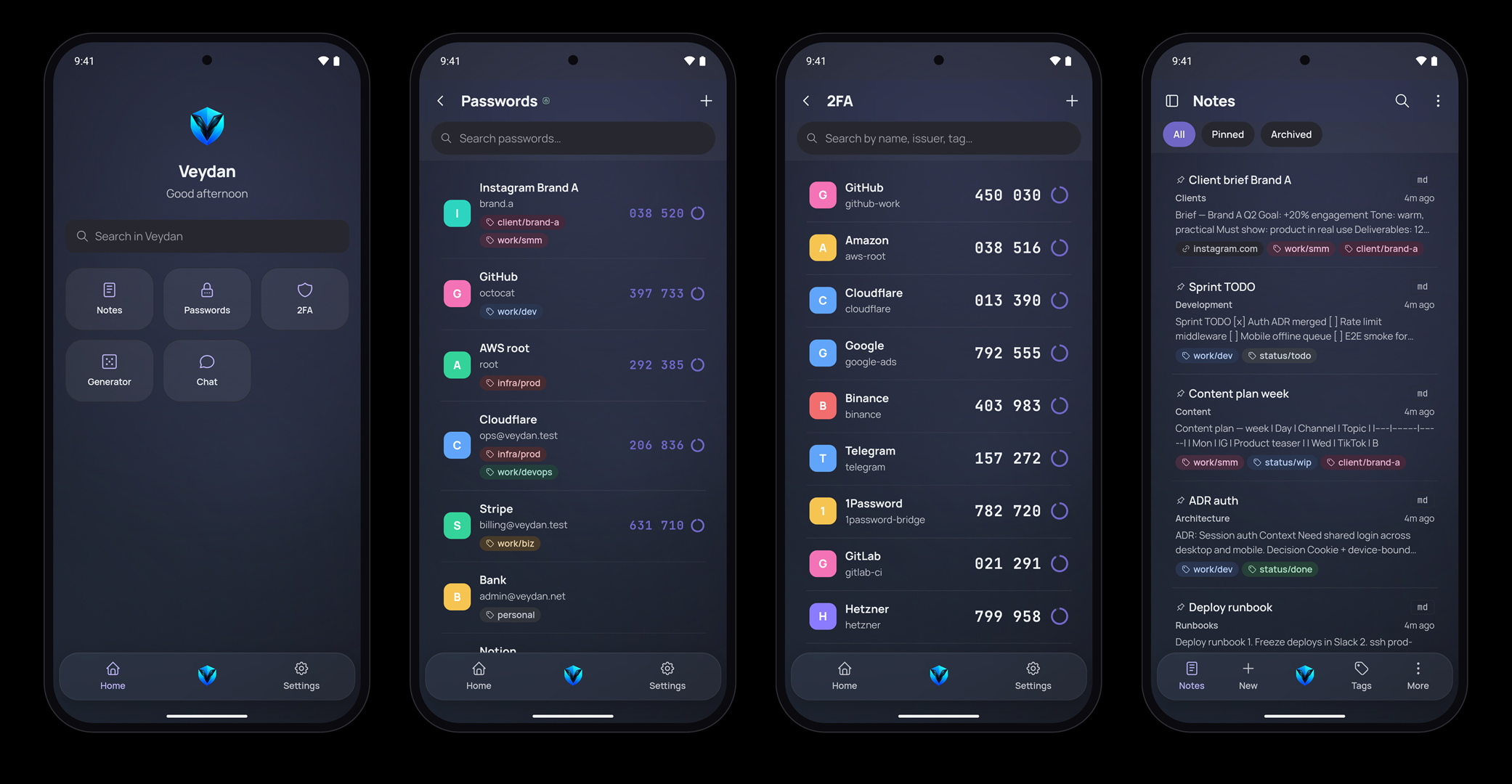
Don’t take our word for it
Check the code
The source for Veydan Space and every app in the family is on GitHub. Anyone can see how data is stored, how encryption works and what goes over the network. The Veydan Link and Veydan Push servers are open too.
You can read, build and modify the code, but you can’t ship a competing product based on it. It’s source-available, not open source as defined by the OSI.
Your accountsYour dataYour control
Free, no sign-up. The app updates itself, and every update is signed.